October 06, 2024

Little cosmetic update with dark and tinted app icon for iOS 18

 The new version Smartplaylist 13.3.0 provides a dark and tinted app icon for iOS 18.


April 12, 2023

Just to say hello

Just to have a little update here: SmartPlaylist still works nicely in iOS 16.4.1.

... and iOS 17 ...

September 22, 2021

Enlarge artwork to copy the cover text (iOS 15)

With SmartPlaylist you can enlarge the cover artwork to large and full screen size - This makes it easier to use a nice new iOS 15 feature: Text recognition.

How to do it:

1. Enlarge and position the artwork in SmartPlaylist

2. Take a screenshot and open it right away

3. Crop the screenshot to the text, if needed

4. Tap the text recognition icon [=]

5. Select and copy the text you want

6. Paste the text to the app you want


See also How to bring the beautiful cover artwork to the front (wallpaper)

December 21, 2020

iOS 14.3 slows down search -- fixed in iOS 15

Installed iOS 14.3, now "Load list" takes ten times as long as before.

The problem is caused by some new bug in iOS:

[SDKPlayback] SYNC-WATCHDOG-1: Attempting to wake up the remote process

[SDKPlayback] SYNC-WATCHDOG-2: Tearing down connection


UPDATE: With iOS 15 the problem is gone.

September 07, 2020

Save result list from SmartPlaylist as normal playlist

Yes, finally, after ten years, I have found out how to save the result list from SmartPlaylist as a normal (non-smart) playlist in Music. There, you can rename it, play it, reorder titles, edit it, sync it, delete it.

You will get this feature with v13.2, in the list view options (upper right corner).

Each time you tap "Save as Music playlist" a new playlist is created with the (same) name (e.g.) "SmartPlaylist X - Name of your list" and description "Created: date/time".


March 25, 2020

Broken by iOS 13.4

UPDATE: Fixed with SmartPlaylist v13.1.3.

Dear SmartPlaylist users

iOS 13.4 breaks the mechanism for loading a new list (back to Problems continue with iOS 11.4 ...).

I will try to find a solution.

September 25, 2019

SmartPlaylist v13 dark mode

Soon SmartPlaylist v13 for iOS 13(.1) will be ready. Here is how it will look in dark mode:

Search criteria and rules (active rules are marked in purple):


Note here:

  • The music browser/navigator Genre>Composer>Artist>Title ... (remember: navigation levels can be configured) is now opened by tapping the text/row and no longer with "(i)".
  • Rating is now a "normal" numeric field, so you can enter e.g. "<3", "=2-4", "=4,3,0", ">2".

The result list (songs with 5 stars are marked in purple, according to the quick search):


The detail view:


The settings page:


September 10, 2019

SmartPlaylist in iOS 13

SmartPlaylist v12.1.6 will run without problems in iOS 13. But it will not have this new "dark" or rather "negative" mode. This will be supported in SmartPlaylist v13 later on.

July 23, 2019

Have to remove cover artwork from App Store screenshots, again

This year is SmartPlaylist's tenth year in the App Store!

If you search for "SmartPlaylist" in the App Store, will SmartPlaylist appear on top of the list? No, it is buried under tons of other better selling apps with completely different names.

And now, just like four years ago, they ask me to remove cover artwork from my App Store screenshots, for copyright reasons. Pfff ...

See some screenshots on this blog.

September 01, 2018

Privacy Policy

SmartPlaylist does not collect any data from the user.
SmartPlaylist does not share any data with third parties.

May 31, 2018

Problems continue with iOS 11.4

With iOS 11.3 and 11.4  some of the most basic operations do no longer work as before when (re)loading a list:

  • after loading the playback queue iOS 11 now always starts playing the first song in the list - only with new tricks is it possible to tell iOS 11 to use the previously playing song for playback 
  • it is no longer possible to restore the previous playback position of the song that was playing before
With the last update I tried to make the (re)loading seamless without interruption of the playback of the now playing song. But this meant that the new list was not actually loaded as playback queue, as could be verified in the Music app. Surprisingly, no one has complained about that ...

To ensure the correct loading of a SmartPlaylist with the mentioned problems in iOS 11 all I can offer at the moment is this (and even this took a lot of trial and error):
  • Stop playback
  • Set the previously playing song for playback at position 00:00 (but not play it, because this would be a terrible experience when the song was playing before)
Sometimes even this fails and iOS insists on playing the first song in the list!

March 30, 2018

SmartPlaylist and iOS 11.3

iOS 11.3 has fortunately corrected some of the iOS 11 problems described in previous posts.

But is has also introduced the following problems in the music player:

  • The current playback rate can no longer be used and changed. This means SmartPlaylist can no longer slow down or speed up the playback (Playback options: Tempo +/- 0.2). This feature will therefore be removed in the next version of SmartPlaylist  until it works again. But I doubt this will ever come back, just like the "shuffle by album" feature has not come back (see here)
  • The previous playback position is (sometimes) ignored when starting to play a song after having reloaded the list. Luckily there is a hack which should make this work again in the next version of SmartPlaylist. (UPDATE: Fixed in SmartPlaylist v11.1.2)


March 07, 2018

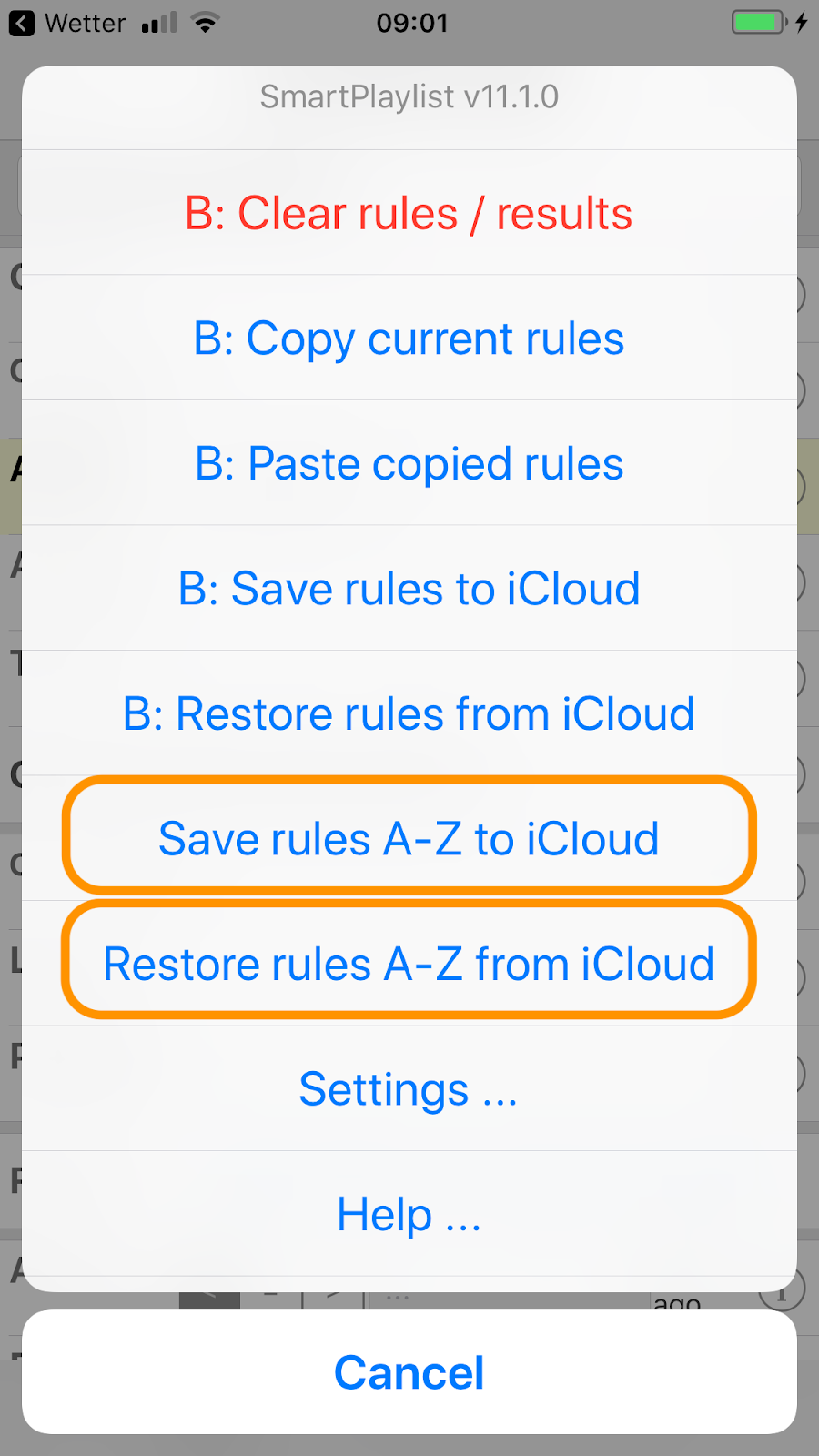
Save/restore search rules of ALL playlists (A-Z) to/from iCloud

With the new version v11.1.0 of SmartPlaylist you can now save the search rules of ALL playlists (A-Z) to iCloud and restore the search rules of ALL playlists (A-Z) from iCloud with one command, respectively:

In this example with SmartPlaylist B all commands starting with "B: ..." will be applied only to playlist B. The two commands for "A-Z" (marked orange) will process all playlists A-Z.

January 27, 2018

More iOS 11 problems

I experience three types of problems with SmartPlaylist in iOS 11 (since 11.2):
  1. The app as a whole, like many other apps as well, is very often restarted after having used another app. Before you used to be back in SmartPlaylist where/how you had left it.
  2. Loading titles and saving the playlist now takes much longer than before.
  3. The user interface freezes up to 8 seconds (!) when you press on another song to play or even just pause/play a song. This has been reported by other developers in the Apple developer forum as well - but no fix from Apple yet ...

November 29, 2017

iOS 11: Problems with play count / last played, rating not syncing

Some users observe that when they have played a song in SmartPlaylist the play count / last played date are not updated. Some also say that the rating they do in SmartPlaylist is not synced to iTunes.

In all these cases it is iOS 11 which causes those problems. It is the Music app in the background which sets (or should set ...) the play count and last played date. But sometimes this does just not happen. SmartPlaylist can only read the values from the Music app. Also, if the rating does not sync to iTunes, it is a iOS 11 problem, since SmartPlaylist has nothing to do with the syncing process.

Personally, I had the play count and last played date problems only at the very beginning of iOS 11. After a while it got okay again, but I don't know when/why exactly. Make sure you update to the latest version of iOS 11.

July 17, 2017

Update lists before adding/subtracting/intersecting them

When you do list operations, i.e. adding/subtracting/intersecting other lists with a "parent" list, SmartPlaylist currently takes the last saved titles from them.
With the next version of SmartPlaylist there will be a new behaviour:
Lists will be automatically updated (loaded and saved) before adding/subtracting/intersecting them to/from/with the parent list. Like that you no longer need to go and reload them one by one before using them in a parent list.


Some hints about list operations:
  • If you do not specify any search rules SmartPlaylist will load ALL songs you have in your media library. Adding other lists to that will have no effect, of course.
  • If you want to have a list, say "A", just to add/subtract/intersect other lists, you have to specify an "impossible" rule like "Genre xyz" in "A" - this gives you an empty list to which you can add other lists
  • SmartPlaylist always first adds the "+" (add) lists, then subtracts the "-" (subtract) lists and finally intersects this result with the "=" (intersect) lists

June 12, 2017

Search with Safari from SmartPlaylist (v10.3.1)

"Search with Safari ..." proposes different search terms based on composer, title, artist, etc. which then are passed to Safari to search the Web (using your default search engine). One of the terms is for example "Lyrics <title>, <artist>" to quickly search for the lyrics of a song.

June 04, 2017

Search in iTunes Store from SmartPlaylist (v10.3)

Similar to "Load all titles with same ..." you can now use "Search in iTunes Store ..."

to get a list of search terms from the genre, composer, artist, artist/genre, album, album/artist, title and title/artist of the selected song. The one you pick will be sent to the iTunes Store app on your device, ...


where it is automatically used to search and show the results:


You can easily go back to SmartPlaylist (upper left) and redo it with a different search term.

May 30, 2017

Small update (v10.2)

This update of SmartPlaylist lets you easily rate the app itself after you use "Rate this title ..." in the detail view:

This is an Apple component (SKStoreReviewController). I hope it will not annoy you but rather make you give a high rating ... (thanks!)

November 05, 2016

Rating songs in iOS 10? Yes, with SmartPlaylist v10.1

The latest Music app no longer offers a way to see or modify the song rating (0-5), which is so important to many of us.

UPDATE: With SmartPlaylist v10.1 you can rate songs directly in SmartPlaylist and it syncs back to iTunes. (Like this you can also rate songs which are not playing at the moment)