This year is SmartPlaylist's tenth year in the App Store!
If you search for "SmartPlaylist" in the App Store, will SmartPlaylist appear on top of the list? No, it is buried under tons of other better selling apps with completely different names.
And now, just like four years ago, they ask me to remove cover artwork from my App Store screenshots, for copyright reasons. Pfff ...
See some screenshots on this blog.

September 01, 2018
Privacy Policy
SmartPlaylist does not collect any data from the user.
SmartPlaylist does not share any data with third parties.
SmartPlaylist does not share any data with third parties.
May 31, 2018
Problems continue with iOS 11.4
With iOS 11.3 and 11.4 some of the most basic operations do no longer work as before when (re)loading a list:
- after loading the playback queue iOS 11 now always starts playing the first song in the list - only with new tricks is it possible to tell iOS 11 to use the previously playing song for playback
- it is no longer possible to restore the previous playback position of the song that was playing before
With the last update I tried to make the (re)loading seamless without interruption of the playback of the now playing song. But this meant that the new list was not actually loaded as playback queue, as could be verified in the Music app. Surprisingly, no one has complained about that ...
To ensure the correct loading of a SmartPlaylist with the mentioned problems in iOS 11 all I can offer at the moment is this (and even this took a lot of trial and error):
- Stop playback
- Set the previously playing song for playback at position 00:00 (but not play it, because this would be a terrible experience when the song was playing before)
Sometimes even this fails and iOS insists on playing the first song in the list!
March 30, 2018
SmartPlaylist and iOS 11.3
iOS 11.3 has fortunately corrected some of the iOS 11 problems described in previous posts.
But is has also introduced the following problems in the music player:
But is has also introduced the following problems in the music player:
- The current playback rate can no longer be used and changed. This means SmartPlaylist can no longer slow down or speed up the playback (Playback options: Tempo +/- 0.2). This feature will therefore be removed in the next version of SmartPlaylist until it works again. But I doubt this will ever come back, just like the "shuffle by album" feature has not come back (see here)
- The previous playback position is (sometimes) ignored when starting to play a song after having reloaded the list. Luckily there is a hack which should make this work again in the next version of SmartPlaylist. (UPDATE: Fixed in SmartPlaylist v11.1.2)
March 07, 2018
Save/restore search rules of ALL playlists (A-Z) to/from iCloud
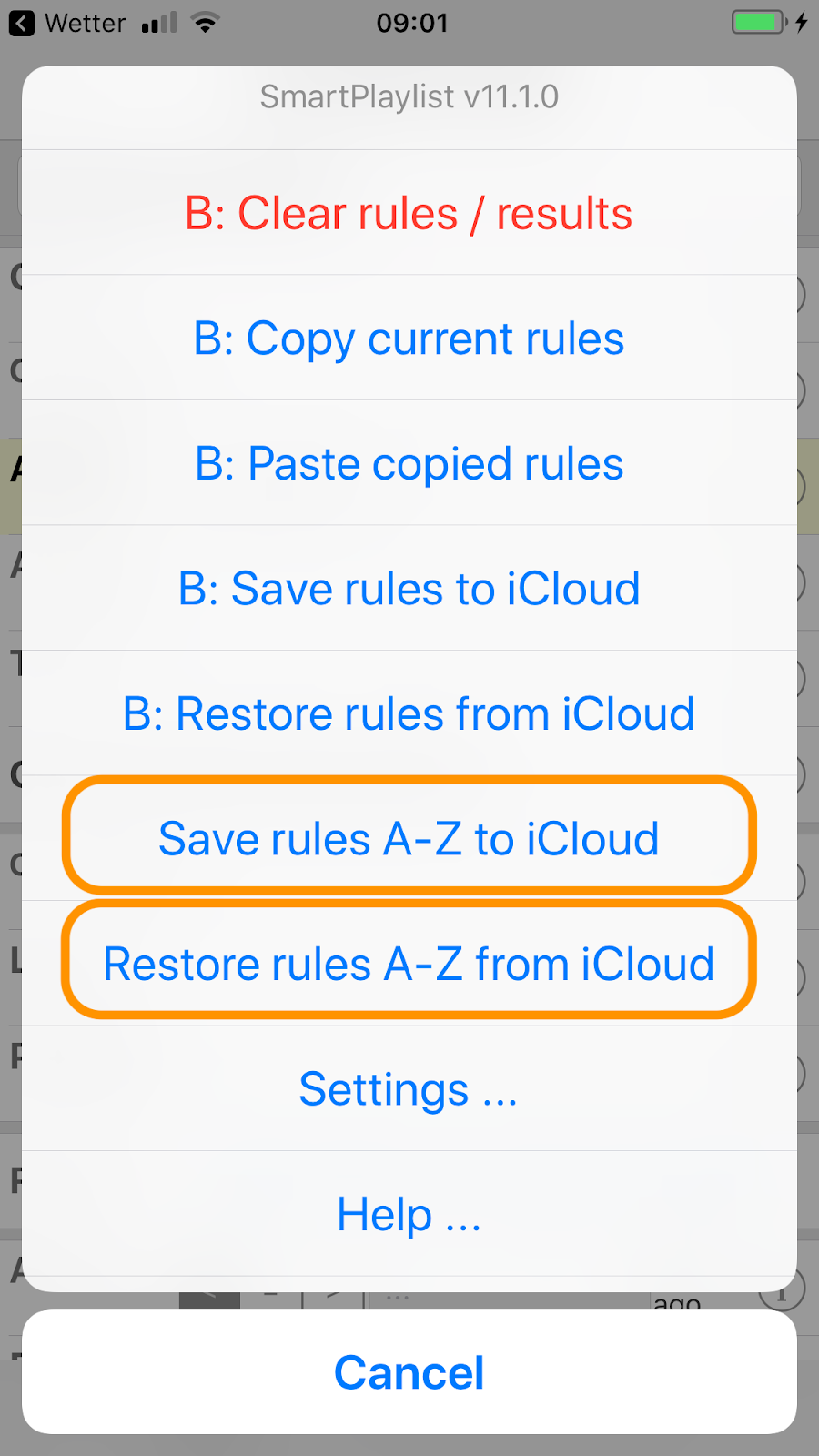
With the new version v11.1.0 of SmartPlaylist you can now save the search rules of ALL playlists (A-Z) to iCloud and restore the search rules of ALL playlists (A-Z) from iCloud with one command, respectively:

In this example with SmartPlaylist B all commands starting with "B: ..." will be applied only to playlist B. The two commands for "A-Z" (marked orange) will process all playlists A-Z.
In this example with SmartPlaylist B all commands starting with "B: ..." will be applied only to playlist B. The two commands for "A-Z" (marked orange) will process all playlists A-Z.
Subscribe to:
Posts (Atom)